
Veer Game Gift Code
Veer Game gift codes are posted on the official Telegram channel and redeemed inside the app. Each works once per account and expires quickly.
Here’s how to use one.
GIFT CODE PAGE
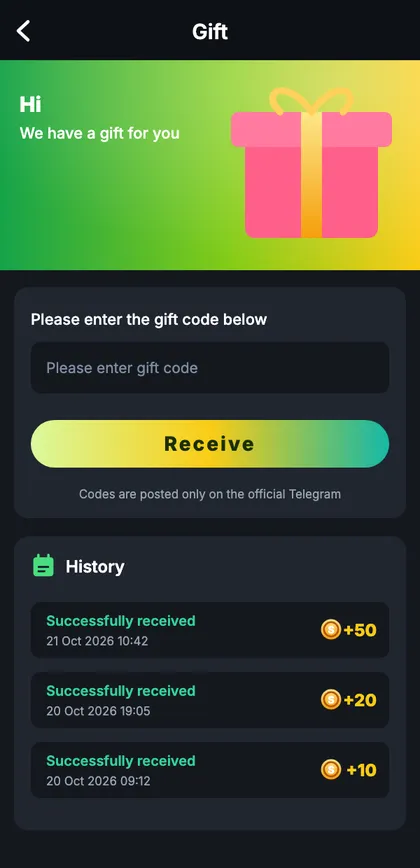
Veer Game gift code
Code box, Receive button and your redemption history.
On this page
How to redeem
- Copy the code from the official channel.
- Open Account → Gift code.
- Paste and tap Receive.
- Check ‘Successfully received’.
Error messages
| Message | Meaning |
|---|---|
| Expired | Time window closed |
| Fully used | Limit reached |
| Invalid | Typo or space |
| Already received | One use per account |
Scams to avoid
- Paid ‘VIP’ codes.
- ‘Log in here to claim’ links.
- DMs from fake admins.
- Code generator apps.
A gift code, start to finish
The official channel posts a code. You long-press, copy, open Veer Game (already logged in), go to Account → Gift code, paste and tap Receive. ‘Successfully received’ appears – twenty seconds in all. A friend who tries ten minutes later sees ‘fully used’. Speed is the only trick.
Keeping codes in perspective
Codes are a small extra. Missing one costs nothing. If chasing them pulls you into the app late at night, mute the channel and check it when it suits you.
Gift code glossary
| Word | Meaning |
|---|---|
| Code | Short string of letters and numbers |
| Expiry | When it stops working |
| Use limit | How many accounts can redeem it |
| History | Your past redemptions |
“Do codes work on the website?”
Yes – Account → Gift code works in any browser.
“Is there a fixed time for codes?”
No – follow the official channel.
Start with Veer Game the safe way
Use the official app or website – one Veer Game account works on every device.
Frequently asked questions
Where are codes posted?
Official Telegram channel.
Can I use a code twice?
No.