
Veer Game Forgot Password
If you still have the SIM you registered with, you can reset your Veer Game password yourself in about two minutes.
PASSWORD RESET
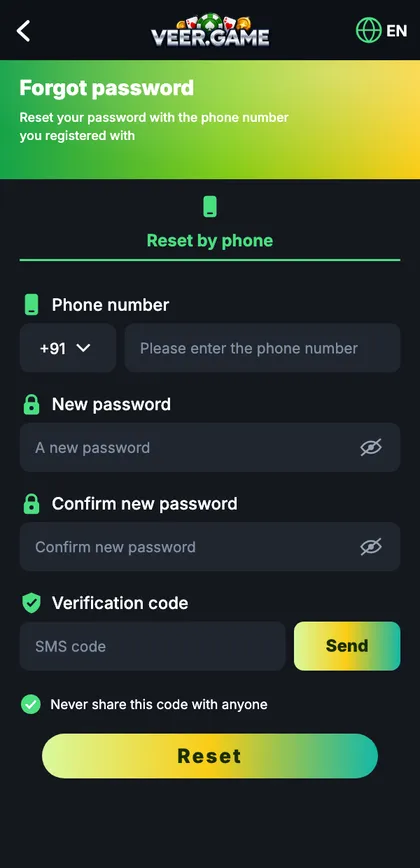
Veer Game forgot password
Registered phone number, new password, confirm password and SMS verification code.
On this page
Reset your password
- Tap Forgot password on the login screen.
- Enter your registered number.
- Type a new password twice.
- Tap Send and enter the SMS code.
- Tap Reset and log in.
A strong new password
- 8+ characters (12+ is better).
- Three unrelated words + a number.
- Not your name, number or birthday.
- Not used elsewhere.
If the reset fails
No SMS
Check number, spam, DND and active SIM.
Number not registered
Try your other SIM.
Lost SIM
Get a replacement or contact customer care.
Code expired
Request a new one.
Why not keep guessing?
Several wrong passwords trigger a temporary lock of 15–30 minutes, and more attempts can extend it. A reset takes two minutes – after two careful tries, resetting is always faster.
After resetting
- Log in again on your other devices.
- Update your password manager.
- Bind an email as a backup.
- Turn on login alerts.
If you no longer have the number
Your operator can usually issue a replacement SIM with the same number after ID checks – often the fastest route. If the number can’t be recovered, contact customer care with your UID and nickname so they can verify you and help move the account.
“Will resetting log me out elsewhere?”
Yes – every other session ends.
“Can I reset from a laptop?”
Yes; the code still goes to your phone.
Start with Veer Game the safe way
Use the official app or website – one Veer Game account works on every device.
Frequently asked questions
Can support tell me my password?
No – nobody can see it.