
Veer Game Register
Creating a Veer Game account takes about a minute. You need an Indian mobile number that receives SMS, a new password and – optionally – a friend’s invite code.
This page walks through every field, explains what the app checks, and lists fixes for the problems people hit most.
OFFICIAL REGISTRATION SCREEN
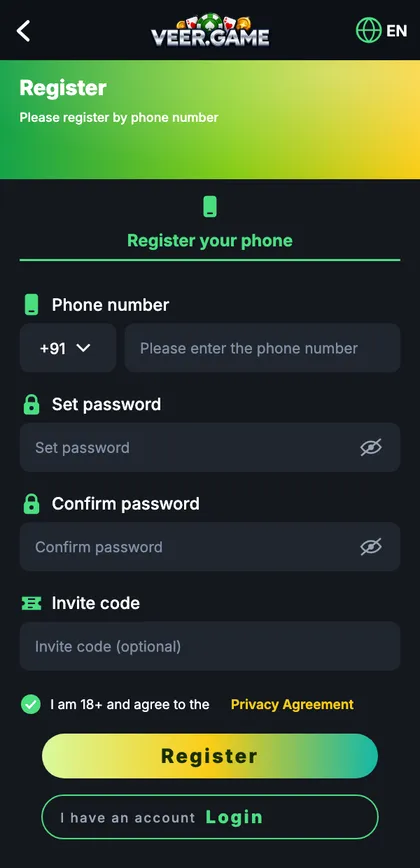
Veer Game register screen
Phone number, set password, confirm password, invite code and the 18+ agreement.
On this page
- Veer Game register overview
- Step-by-step: how to register on Veer Game
- Registration specifications
- Registered account vs just browsing
- Eligibility & fair play
- Fixes for common sign-up problems
- What to do right after registering
- Choosing the right number
- A strong, memorable password
- What the app checks when you tap Register
- A registration, start to finish
- Privacy at sign-up
- FAQs
Veer Game register overview
Registration creates a single account that works on the Android app, the iPhone home-screen app and any browser. Your mobile number becomes your login ID and the place where password-reset codes are sent, so choose a number you’ll keep.
Step-by-step: how to register on Veer Game
- Open the official Veer Game app or website and tap Register.
- Keep +91 and enter your ten-digit number – no leading 0.
- Type a password of at least 8 characters in Set password.
- Type it again in Confirm password – by hand, not paste.
- Enter an invite code if a friend gave you one; otherwise leave it empty.
- Tick the box confirming you’re 18+ and accept the privacy agreement.
- Tap Register and enter the 6-digit SMS code.
- You’ll see the lobby and a new UID at the top.
Registration specifications
| Item | Details |
|---|---|
| Cost | Free |
| Time | About one minute |
| Login ID | Mobile number |
| Verification | 6-digit SMS code |
| Invite code | Optional |
| Age | 18+ |
Registered account vs just browsing
| Registered | Not registered | |
|---|---|---|
| See the lobby and rules | Yes | Partly |
| Join rounds | Yes | No |
| Check-in, gift codes, VIP | Yes | No |
| Customer support | Full | General only |
Eligibility & fair play
- You must be 18 or older.
- One account per person and per number.
- Use your own number and your own password.
- No scripts, auto-clickers or modified apps.
Fixes for common sign-up problems
“Phone number already registered”
You already have an account – use login or forgot password.
“Passwords do not match”
Retype both boxes by hand; copy-paste adds hidden spaces.
SMS code not arriving
Check the number, spam folder, DND and which SIM is active; wait for the timer before resending.
“Invalid invite code”
Clear the box and register without it.
Register button does nothing
Tick the 18+ box and fix any field showing red text.
What to do right after registering
- Write down your UID.
- Change the default nickname.
- Bind an email as a backup login.
- Turn on login alerts.
- Read the rules of one game before playing.
Choosing the right number
This number becomes your login ID and the only place reset codes go. A number you’ll still have next year is ideal; office SIMs, a relative’s number or a temporary travel SIM all cause problems later.
| Number | Verdict |
|---|---|
| Your main personal SIM | Best |
| Second SIM that always receives SMS | Fine |
| Work SIM | Avoid |
| Family member’s number | Never |
| Temporary SIM | Never |
A strong, memorable password
Picture three unrelated things – a green kite over a river – and join them: green-kite-river-38. It’s long, easy to remember and hard to guess. Avoid your name, phone number, birthday or anything with ‘veer’ in it, and never reuse your email or UPI password.
What the app checks when you tap Register
| Step | Check |
|---|---|
| 1 | Is the number already registered? |
| 2 | Do the passwords match? |
| 3 | Is the 18+ box ticked? |
| 4 | SMS sent – timer starts |
| 5 | Code checked – account created |
“The code arrived but it says incorrect.”
You probably typed an older code. Use only the newest SMS.
“I closed the page before entering the code.”
Start again and request a new code after the timer.
“Will other players see my number?”
No – they see your nickname.
A registration, start to finish
Arjun opens the official site from his bookmark and taps Register. He types his ten digits and checks them twice. For the password he pictures a blue bicycle on a hill and types blue-bicycle-hill-41 into both boxes, checking each with the eye icon. Nobody gave him an invite code, so he leaves it blank. He ticks the 18+ box and taps Register. The SMS arrives in seconds; his phone offers to paste it. He’s in the lobby. Before playing anything, he writes down his UID, binds his email and turns on login alerts. Four minutes total.
Privacy at sign-up
Registration needs only a mobile number and a password. You’re never asked for Aadhaar, PAN, bank details or a photo to create an account. If a page or person asks for those ‘to verify’ you, it’s a scam.
Start with Veer Game the safe way
Use the official app or website – one Veer Game account works on every device.
Frequently asked questions
Is Veer Game registration free?
Yes.
Do I need an invite code?
No – it’s optional.
Can I register with email only?
No – register with a mobile number and bind an email later.
How long is the SMS code valid?
A few minutes.
Can I have two accounts?
No.